Showing posts with label WCF RIA Services. Show all posts

Wednesday, February 2, 2011

Silverlight, PRISM, MVVM, MEF – Part 5

Authentication in Silverlight applications that use WCF RIA services can make use of the WCF RIA services authentication framework. WCF RIA Services builds upon the ASP.NET Membership framework by exposing the Membership framework to rich Internet clients through the authentication domain service. After adding an authentication domain service, you can enable the following functions:
  • Authentication - to verify a user's credentials and mark the user as logged in or logged out.
  • Roles - to group users by responsibilities and grant resource permissions to authenticated members of a group.
  • Profiles - to retain properties for authenticated users and retrieve those properties in your application.

This post demonstrates how to enable user authentication in your prism application using RIA services.
RIA Services provides the authentication domain service template to facilitate authentication on the presentation tier. The authentication domain service derives the AuthenticationBase class which contains the profile properties for the authenticated user. This service is accessed via the WebContext class which is automatically generated by the RIA services. You can also create your custom implementation for the membership provider and configure the service to use this instead of the default provider.
For e.g.:
public class BlogsPrajeeshMembershipProvider : MembershipProvider
{
    public override string ApplicationName
    {
        get
        {
            return "BlogsPrajeesh.PrismSamples";
        }
        set { }
    }

    //Other methods…

    public override bool ValidateUser(string username, string password)
    {
        if (username == "Prajeesh" && password == "Password") return true;
        return false;
    }
}

Configuring the membership provider in the Web.config file.
<system.web>
  <httpModules>
    <add name="DomainServiceModule" type="System.ServiceModel.DomainServices.Hosting.DomainServiceHttpModule, System.ServiceModel.DomainServices.Hosting, Version=4.0.0.0, Culture=neutral, PublicKeyToken=31bf3856ad364e35" />
  httpModules>
  <compilation debug="true" targetFramework="4.0">
    <assemblies>
      <add assembly="System.Data.Entity, Version=4.0.0.0, Culture=neutral, PublicKeyToken=b77a5c561934e089" />
    assemblies>
  compilation>
  <authentication mode="Forms" />
  <membership defaultProvider="BlogsPrajeeshMembershipProvider">
    <providers>
      <add name="BlogsPrajeeshMembershipProvider" type="BlogsPrajeesh.PrismSamples.Web.BlogsPrajeeshMembershipProvider, BlogsPrajeesh.PrismSamples.Web"/>
    providers>
  membership>
system.web>

To use this authentication service in the Silverlight client, configure the WebContext in App.xaml.cs file as
public App()
{
    this.Startup += this.Application_Startup;
    this.Exit += this.Application_Exit;
    this.UnhandledException += this.Application_UnhandledException;

    InitializeComponent();

    WebContext context = new WebContext();
    context.Authentication = new FormsAuthentication();
    ApplicationLifetimeObjects.Add(context);
}
Later in the Shell
public Shell()
{
    InitializeComponent();
    this.Loaded += new RoutedEventHandler((x, y) =>
    {
        if (WebContext.Current.Authentication.User != null && !WebContext.Current.Authentication.User.Identity.IsAuthenticated)
            {
                RegionManager.Regions["LoginRegion"].Add(LoginView, "LoginView");
                RegionManager.Regions["LoginRegion"].Activate(LoginView);                    
            }
    });
}
The LoginViewModel code that authenticates the user
[Export(typeof(LoginViewModel))]
[PartCreationPolicy(CreationPolicy.NonShared)]
public class LoginViewModel : NotificationObject
{
    [ImportingConstructor]
    public LoginViewModel(IRegionManager regionManager)
    {
        _regionManager = regionManager;
        LoginCommand = new DelegateCommand(() => PerformLogin());
        this.PropertyChanged += new System.ComponentModel.PropertyChangedEventHandler((x, y) => RaiseCommandChanged());
    }

    private void RaiseCommandChanged()
    {
        LoginCommand.RaiseCanExecuteChanged();
    }

    private void PerformLogin()
    {
        var webContext = WebContext.Current;
        webContext.Authentication.Login("Prajeesh", "Password");
        webContext.Authentication.LoggedIn += new EventHandler((x, y) =>
        {
            var loginView = _regionManager.Regions["LoginRegion"].GetView("LoginView");
            _regionManager.Regions["LoginRegion"].Remove(loginView);
        });
    }

    //Other methods…

}

Wednesday, January 19, 2011

Silverlight, PRISM, MVVM, MEF – Part 4

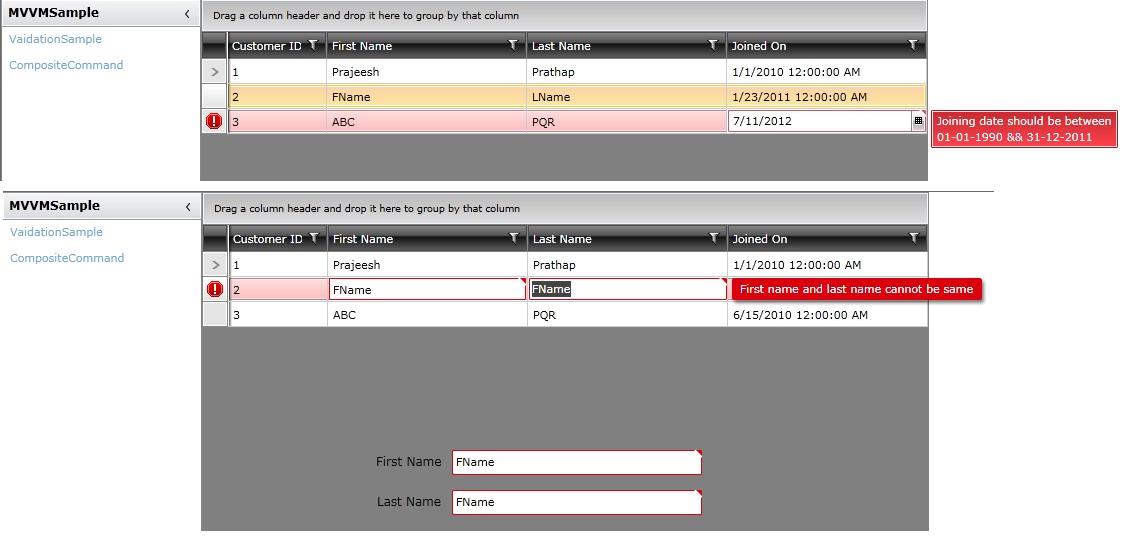
In my previous post http://blogsprajeesh.blogspot.com/2011/01/silverlight-prism-mvvm-mef-part-3.html, I explained how to add validation metadata to entities and perform data validation on views in the prism application. The standard validation attributes that ship in the System.ComponentModel.DataAnnotations assembly can cover many common validation scenarios. But if you want to do perform custom validations on the business logic, you need to use the CustomValidationAttribute to implement the validation logic. Like the standard validation attributes, it also allows you to specify an ErrorMessage and the properties that failed the validation. 
Custom validations can be implemented in a separate class which has static methods that perform the validation. For e.g
[MetadataTypeAttribute(typeof(Customer.CustomerMetadata))]
public partial class Customer
{
    [CustomValidation(typeof(CustomerRules), "ValidateCustomer")]
    internal sealed class CustomerMetadata
    {
        private CustomerMetadata()
        {
        }       

        [CustomValidation(typeof(CustomerRules), "IsValidJoiningDate")]
        public DateTime? DateOfJoining { get; set; }
    }
}

The above sample code has custom validations implemented on entity and property level. The validation rules are implemented in the CustomerRules class which is shared between the server and the client.
public class CustomerRules
{
    public static ValidationResult ValidateCustomer(Customer customer, ValidationContext context)
    {
        if (string.Compare(customer.FirstName, customer.LastName, StringComparison.OrdinalIgnoreCase) == 0)
            return new ValidationResult("First name and last name cannot be same", new string[] { "FirstName", "LastName" });
        return ValidationResult.Success;
    }

    public static ValidationResult IsValidJoiningDate(DateTime? joiningDate, ValidationContext context)
    {
        if (joiningDate.HasValue)
        {
            if(joiningDate.Value.Year < 1990 || joiningDate.Value.Year > 2011)
                return new ValidationResult("Joining date should be between 01-01-1990 && 31-12-2011", new string[] { "DateOfJoining"});
        }
        return ValidationResult.Success;
    }
}
In the client code XAML, you just need to set the NotifyOnValidationError property to True to notify the user on validation errors
<TextBox Text="{Binding CurrentCustomer.FirstName, Mode=TwoWay, NotifyOnValidationError=True}" Grid.Column="1" Grid.Row="2" Width="250" Height="25" HorizontalAlignment="Left" />
<TextBox Text="{Binding CurrentCustomer.LastName, Mode=TwoWay, NotifyOnValidationError=True}" Grid.Column="3" Width="250" Height="25" HorizontalAlignment="Left" Grid.Row="3" />
<Button Grid.Row="4" Content="Add" prism:Click.Command="{Binding AddCustomerCommand}" Width="120" HorizontalAlignment="Right" />
<telerik:RadGridView HorizontalAlignment="Left" Grid.ColumnSpan="2" Name="radGridView1" VerticalAlignment="Top" ItemsSource="{Binding Customers}" SelectedItem="{Binding CurrentCustomer, Mode=TwoWay}" AutoGenerateColumns="False">
    <telerik:RadGridView.Columns>
        <telerik:GridViewDataColumn DataMemberBinding="{Binding Id, NotifyOnValidationError=True, Mode=TwoWay}" IsReadOnly="True" Header="Customer ID" Width="100" />
        <telerik:GridViewDataColumn DataMemberBinding="{Binding FirstName, NotifyOnValidationError=True, Mode=TwoWay}" Header="First Name" Width="200" />
        <telerik:GridViewDataColumn DataMemberBinding="{Binding LastName, NotifyOnValidationError=True, Mode=TwoWay}" Header="Last Name" Width="200" />
        <telerik:GridViewDataColumn DataMemberBinding="{Binding DateOfJoining, NotifyOnValidationError=True, Mode=TwoWay}" Header="Joined On" Width="200" />
    telerik:RadGridView.Columns>
telerik:RadGridView>

Output