Showing posts with label Enterprise Library. Show all posts

Friday, December 9, 2011

Aspect Oriented Programming and Interceptor pattern - Creating a Session handler for ASP.NET


Interceptor pattern can be used for addressing cross cutting concerns in the application that happens at either the beginning or end of a method. For e.g. checking the validity of the input parameters before executing the method and throwing exceptions, catching and logging exceptions etc. These situations can be encapsulated in a reusable component that can be processed by the compiler and produce executable code (AOP).
Unity allows developers to implement the idea of interception by allowing creation of objects that can add some extra code on the target method before or after the regular execution of these target methods. In this post, I'll show how to create a Session handler for ASP.Net using the interface interception mechanism provided by unity application block, that will allow you to address encapsulate the logic for checking session for a value before execution of the method and returning back the value from session if available. The same handler can be used to also add the return value to the session if not available so that this value can be retrieved next time.
Creating the session handler
public class SessionHandler : ICallHandler
{
    private readonly string _sessionKey;

    public SessionHandler(string sessionKey)
    {
        _sessionKey = sessionKey;
    }

    public ISessionService SessionService
    {
        get { return Container.Instance.Resolve<ISessionService>(); }
    }

    public IMethodReturn Invoke(IMethodInvocation input, GetNextHandlerDelegate getNext)
    {
        if (SessionService.Contains(_sessionKey))
        {
            input.CreateMethodReturn(SessionService.Get(_sessionKey));
            return getNext()(input, getNext);
        }

        var returnValue = getNext()(input, getNext);
        SessionService.Add(_sessionKey, returnValue.ReturnValue);
        return returnValue;
    }

    public int Order { get; set; }
}

The session handler uses the session service which encapsulates the actual Session object to add/ remove values from the session.  You can also use the HttpContext.Current.Session object here.
Creating the Attribute for the handler
public class SessionDependencyAttribute : HandlerAttribute
{
    private readonly string _sessionKey;
       
    public SessionDependencyAttribute(string sessionKey)
    {
        _sessionKey = sessionKey;
    }

    public override ICallHandler CreateHandler(IUnityContainer container)
    {
        return new SessionHandler(_sessionKey);
    }
}

Creating a service and using the SessionHandler we created.
public interface IMockService
{
    [SessionDependency("TestKey")]
    string GetValue(bool flag);
}

public class MockService : IMockService
{
    public string GetValue(bool flag)
    {
        return flag ? "True" : "False";
    }
}

Configuring the Unity container
_container = new UnityContainer();
_container.AddNewExtension<Interception>();


_container
    .RegisterType<ISessionService, SessionService>()
    .RegisterType<IMockService, MockService>()
    .RegisterType<MockPresenter>()
    .Configure<Interception>().SetDefaultInterceptorFor<IMockService>(new InterfaceInterceptor());

Test cases
[TestMethod]
public void MethodShouldReturnValueFromSessionIfValueDoesNotExistsAndAddToSession()
{
    var service = Container.Instance.Resolve<IMockService>();
    var actual = service.GetValue(true);

    Assert.IsTrue(SessionService.Contains("TestKey"));
}

Friday, December 17, 2010

Enterprise Library Security Application block – Rule based authorization

Enterprise library security application block's Authorization provider can be used to create an effective solution for rule based security implementation in your application code. The security application block can be used to configure an Authorization provider and use this to map task based authorization to complex combination of roles. Later you can use these rules to verify permissions on the current user to perform an action.
In this post, I’ll show a simple implementation of a rule based authorization provider and its uses. The data model used in our sample looks like

I have created some SQL scripts to insert data into the relevant tables.  
INSERT INTO [dbo].[Role]([Id] ,[Name]) VALUES (NEWID() ,'SuperUser')
INSERT INTO [dbo].[Role]([Id] ,[Name]) VALUES (NEWID() ,'Guest')
INSERT INTO [dbo].[Role]([Id] ,[Name]) VALUES (NEWID() ,'NormalUser')
GO


INSERT INTO [dbo].[User]([Id] ,[FirstName] ,[LastName] ,[Email] ,[Password])
     VALUES (NEWID() ,'SuperUserFName' ,'SuperUserLName' , 'SuperUser@Company.com' , 'SuperUserPassword')
INSERT INTO [dbo].[User]([Id] ,[FirstName] ,[LastName] ,[Email] ,[Password])
     VALUES (NEWID() ,'GuestFName' ,'GuestLName' , 'Guest@Company.com' , 'GuestPassword')
INSERT INTO [dbo].[User]([Id] ,[FirstName] ,[LastName] ,[Email] ,[Password])
     VALUES (NEWID() ,'NormalUserFName' ,'NormalUserLName' , 'NormalUser@Company.com' , 'NormalUserPassword')
INSERT INTO [dbo].[User]([Id] ,[FirstName] ,[LastName] ,[Email] ,[Password])
     VALUES (NEWID() ,'ITDeptFName' ,'ITDeptLName' , 'ITDept@Company.com' , 'ITDeptPassword')
GO


DECLARE @SuperUserId uniqueidentifier
DECLARE @SuperRoleId uniqueidentifier
SELECT @SuperUserId = Id FROM [User] WHERE [FirstName] = 'SuperUserFName'
SELECT @SuperRoleId = Id FROM [Role] WHERE [Name] = 'SuperUser'

INSERT INTO [dbo].[UserRole]([UserId], [RoleId] ,[Id])
     VALUES(@SuperUserId ,@SuperRoleId ,NEWID())
GO
Next we’ll configure rules using the Enterprise Library security application block.
1.       Open the App.Config file in the Enterprise Library Configuration editor and select Add Security Sections from the Blocks menu.
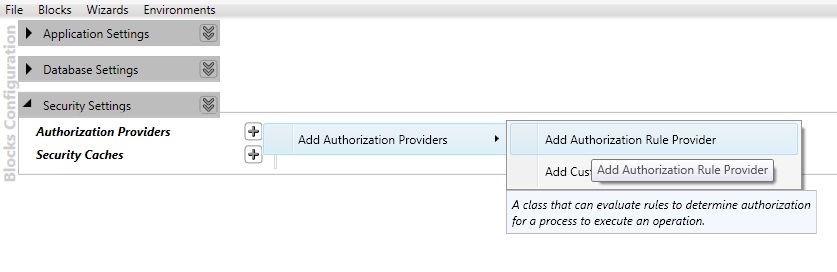
2.       Add a new Authorization rule provider as shown in the image below.

3.       Give an appropriate name and add a new Authorization rule to the provider. In this sample I have used the name as MyBusinessRule
4.       We will create two rules (AddProfile and ApproveProfileChanges).

5.       For the AddProfile rule add the Rule Expression as R:SuperUser AND R:NormalUser
6.       For the ApproveProfile rule the rule expression is R:SuperUser
7.       Save and close your config file.
8.       The final output looks like
<configSections>
  <section name="securityConfiguration" type="Microsoft.Practices.EnterpriseLibrary.Security.Configuration.SecuritySettings, Microsoft.Practices.EnterpriseLibrary.Security, Version=5.0.414.0, Culture=neutral, PublicKeyToken=null" requirePermission="true" />
configSections>
<securityConfiguration defaultAuthorizationInstance="MyBusinessRule">
  <authorizationProviders>
    <add type="Microsoft.Practices.EnterpriseLibrary.Security.AuthorizationRuleProvider, Microsoft.Practices.EnterpriseLibrary.Security, Version=5.0.414.0, Culture=neutral, PublicKeyToken=null"
      name="MyBusinessRule">
      <rules>
        <add expression="R:SuperUser" name="Approve Profile Changes" />
        <add expression="R:SuperUser AND R:NormalUser" name="Add Profile" />
      rules>
    add>
  authorizationProviders>
securityConfiguration>
9.       In your business layer add references to the following assemblies
·         Microsoft.Practices.EnterpriseLibrary.Common.dll
·         Microsoft.Practices.EnterpriseLibrary.Security.dll
·         Microsoft.Practices.ServiceLocation.dll
10.   Create a class RuleAuthorizationManager and add the authorization logic for the user role for a configured rule.
public class RuleAuthorizationManager
{
    public static bool IsUserAuthorized(string ruleName)
    {
        var ruleProvider = EnterpriseLibraryContainer.Current.GetInstance<IAuthorizationProvider>();
        return ruleProvider.Authorize(Thread.CurrentPrincipal, ruleName);
    }
}
11.      In the service class you can use the IsUserAuthorized method to check for permissions.
public void AddRoleToUser(Guid userId, Role role)
{
    if(!RuleAuthorizationManager.IsUserAuthorized(RuleNames.AddProfile))
        throw new SecurityException("User not authorized to add profile");

    var repository = new Repository(new UserModelContainer());
    var user = repository.GetSingle<User>(u => u.Id == userId);

    //Code to add a role to user.
}
Unit tests
[TestMethod()]
[ExpectedException(typeof(SecurityException))]
public void ApproveProfileChanges_should_throw_security_exception_if_user_does_not_have_permission_to_add_profile()
{
    UserService target = new UserService();
    User user = new Repository(new UserModelContainer()).GetSingle<User>(u => u.FirstName == "GuestFName");
    IIdentity identity = new GenericIdentity("Guest@Company.com");
    string[] roles = new string[] { "Guest" };

    IPrincipal principal = new GenericPrincipal(identity, roles);
    Thread.CurrentPrincipal = principal;

    target.ApproveProfileChanges(user);
}

Monday, July 5, 2010

Data Access Application Block 5.0 – Part 3

Updating data
The Data Access block provides features that support data updates. You can execute update queries (such as INSERT, DELETE, and UPDATE statements) directly against a database using the ExecuteNonQuery method. The ExecuteNonQuery method has a broad set of overloads. You can specify a CommandType (the default is StoredProcedure) and either a SQL statement or a stored procedure name. You can also pass in an array of Object instances that represent the parameters for the query.
The data accessor instance passed as parameter to the update method in the repository class methods are later used to construct the updated entity object. The code sample is as
public class CustomerUpdateAccessorFactory : ISaveAccessorFactory<Customer, long, CustomerUpdateIdentity>
{
    public DataAccessor<CustomerUpdateIdentity> ConstructDataAccessor(Database database)
    {
        return database.CreateSprocAccessor<CustomerUpdateIdentity>("usp_UpdateCustomer", new UpdateCustomerParameterMapper(), ConstructMapper());
    }

    public IRowMapper<CustomerUpdateIdentity> ConstructMapper()
    {
        IRowMapper<CustomerUpdateIdentity> rowMapper = MapBuilder<CustomerUpdateIdentity>.MapAllProperties()
            .Map(x => x.Version).WithFunc(dataRecord =>
            {
                int index = dataRecord.GetOrdinal("VersionNew");
                if (!dataRecord.IsDBNull(index))
                {

                    byte[] version = new Byte[(dataRecord.GetBytes(index, 0, null, 0, int.MaxValue))];
                    dataRecord.GetBytes(index, 0, version, 0, version.Length);
                    return version;
                }
                return null;
            })
            .Build();
        return rowMapper;
    }

    public object[] LoadParameters(Customer entity)
    {
        return new object[] { entity.Id, entity.FirstName, entity.LastName, entity.Address, entity.Version };
    }
}

The repository method for update
public TIdentity Save(ISaveAccessorFactory saveAccessorFactory, T entity)
{
    return saveAccessorFactory.ConstructDataAccessor(___Database)
        .Execute(saveAccessorFactory.LoadParameters(entity))
        .FirstOrDefault();
}

[TestMethod]
public void Can_updated_values_into_db()
{
    var baseRepository = new BaseRepository<Customer, long>();
    Customer existingCustomer = baseRepository.FindOne<long>(new GetCustomerAccessor(), 288);
    var customerUpdateIdentity = baseRepository.Save<CustomerUpdateIdentity>(new CustomerUpdateAccessorFactory(), existingCustomer);
    Assert.IsNotNull(customerUpdateIdentity.ChangedDate);
    Assert.IsNotNull(customerUpdateIdentity.Version);
}

Sunday, July 4, 2010

Data Access Application Block 5.0 – Part 2

Using DataAccessor Factory methods to retrieve data using data access application block.
 The data access application block contains features that allow you to extract data using a SQL statement or a stored procedure as the query, and have the data returned to you as a sequence of objects that implements the IEnumerable interface. This allows you to execute queries, or obtain lists or arrays of objects that represent the original data in the database.
The block provides two core classes for performing this kind of query: the SprocAccessor and the SqlStringAccessor. You can create and execute these accessors in one operation using the ExecuteSprocAccessor and ExecuteSqlAccessor methods of the Database class, or create a new accessor directly and then call its Execute method.
Accessors use two other objects to manage the parameters you want to pass into the accessor (and on to the database as it executes the query), and to map the values in the rows returned from the database to the properties of the objects it will return to the client code.

The accessor will attempt to resolve the parameters automatically using a default mapper if you do not specify a parameter mapper. However, this feature is only available for stored procedures executed against SQL Server and Oracle databases. It is not available when using SQL statements, or for other databases and providers, where you must specify a custom parameter mapper that can resolve the parameters.
If you do not specify an output mapper, the block uses a default map builder class that maps the column names of the returned data to properties of the objects it creates. Alternatively, you can create a custom mapping to specify the relationship between columns in the row set and the properties of the objects.
The below code sample shows an example of creating and executing a customer accessor.
public class GetCustomerAccessor : IValueAccessorFactory<Customer, long, long>
{
    public DataAccessor<Customer> ConstructDataAccessor(Database database)
    {
        return database.CreateSprocAccessor<Customer>("usp_GetCustomerById", new GetCustomerParameterMapper(), ConstructMapper());
    }

    public IRowMapper<Customer> ConstructMapper()
    {
        IRowMapper<Customer> customerMapper = MapBuilder<Customer>.MapAllProperties()
            .Map(x => x.Id).ToColumn("CustomerIntId")
            .Map(x => x.Version).WithFunc(dataRecord =>
            {
                int index = dataRecord.GetOrdinal("Version");
                if (!dataRecord.IsDBNull(index))
                {

                    byte[] version = new Byte[(dataRecord.GetBytes(index, 0, null, 0, int.MaxValue))];
                    dataRecord.GetBytes(index, 0, version, 0, version.Length);
                    return version;
                }
                return null;
            })
            .Build();
        return customerMapper;
    }

    public object[] LoadParameters(long id)
    {
        return new Object[] { id };
    }
}

This accessor is called from a BaseRepository implementation to construct the required object
public IEnumerable Find(IAccessorFactory accessorFactory)
{
     return accessorFactory.ConstructDataAccessor(___Database)
                .Execute();
}

Test Methods
[TestMethod]
public void Can_findone_method_return_entity_for_specified_parameter_values()
{
    var baseRepository = new BaseRepository<Customer, long>();
    var customer = baseRepository.FindOne<long>(new GetCustomerAccessor(), 288);
    Assert.IsNotNull(customer, "Failed to retrieve customer");
    Assert.AreEqual<string>(customer.FirstName, "Prajeesh");
}