ADO.NET Data Services enable applications to expose data as a data service that can be consumed by web clients within corporate networks and across the internet. A data service is reachable via regular HTTP requests, using standard HTTP verbs such as GET, POST, PUT and DELETE to perform CRUD operations against the service. The payload format used by the service is controllable by the application, but all options are simple, open formats such as JSON and Atom/APP.
- Create a new ASP.NET web site / ASP.NET web application and name it AdventureWorksServices. (I am going to use the AdventureWorks sample database provided by MS for creating the ADO.NET Data service.
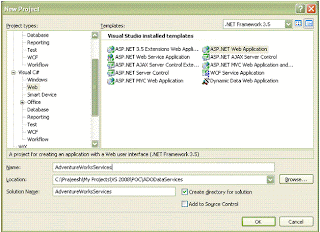
-
Add a new LINQ to SQL class and name it AdventureWorksORM.dbml to the project. Drag and drop the respective tables from the AdventureWorks database for the entities.
-
Add a new ADO.NET Data Service class and name it AdventureWorkService.svc. Change the class definition for the AdventureWorkService class to add the AdventureWorksORMDataContext class as given below
public class AdventureWorksService : WebDataService<AdventureWorksORMDataContext>
{
public static void InitializeService(IWebDataServiceConfiguration config)
{
config.SetResourceContainerAccessRule("*", ResourceContainerRights.AllRead);
-
Run the web site/ web application and you can start querying the database from the URI as given below.

-
For getting the row 1 value for Product.


